



 October 7, 2026
International customers without a Thai mobile number, and customers who don't use LINE, can now join your loyalty program and earn points.
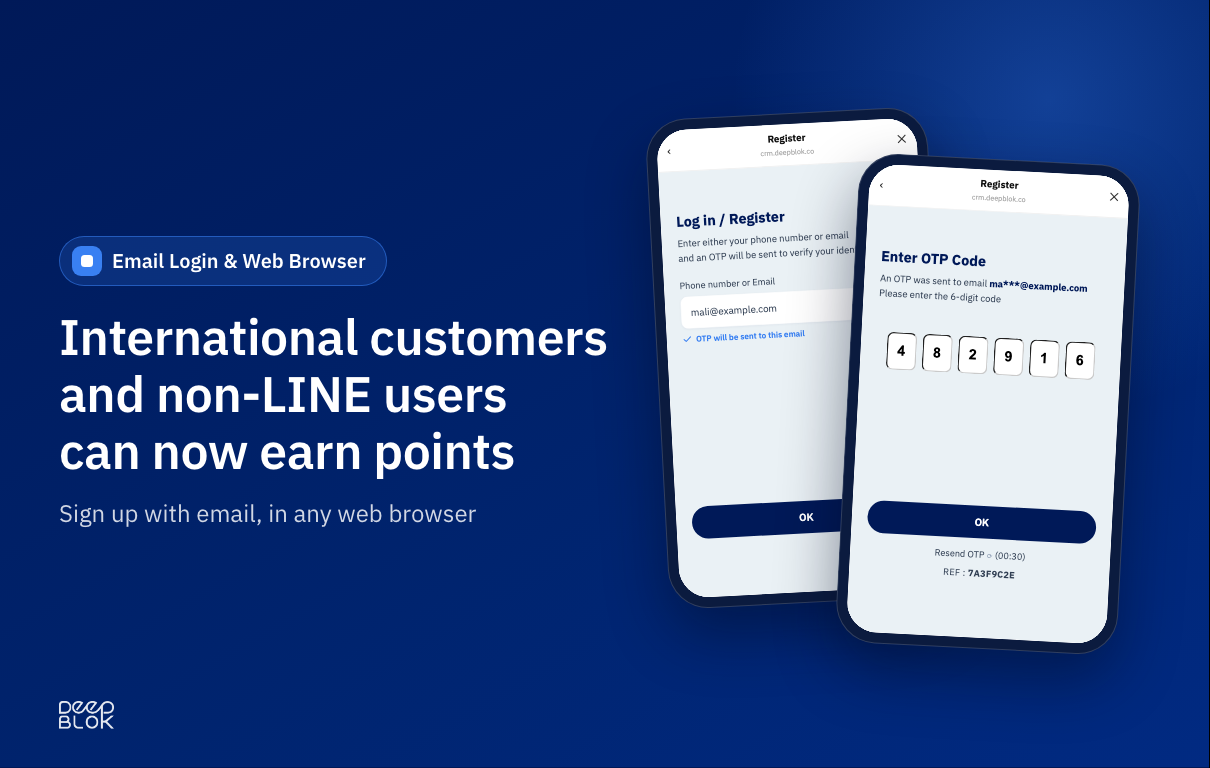
DeepBLOK now supports sign-up and login by email, in addition to phone number. The customer enters an email, receives a 6-digit OTP and is in — with no password to set. The member page opens on LINE and in web browsers such as Chrome, Safari and Edge, and your brand decides whether to accept members by phone, by email, or both.
In short — what's new
- Customers can sign up and log in with email, verified by a 6-digit OTP. No passwords
- The member page opens in a web browser, in addition to LINE. One link and one QR code to place anywhere
- Members without LINE earn points in store: staff scan the QR on the member page, or look the member up by email
- You choose the channels at Settings › Register Form Management. Available to every brand at no extra cost
The members you lose at sign-up never show up in any report
Most brands look at new-member numbers every month. Almost nobody sees the other number: the people who meant to sign up and couldn't.
They didn't change their mind about the brand. They got stuck on a step, and they usually fall into one of three groups.
- International customers without a Thai mobile number — hotel guests, spa clients, tourists walking into a shop. A loyalty program that verifies identity only by SMS to a Thai number turns them away at the first field of the form.
- People who open the link somewhere other than LINE — from your website, an email, a social profile, or a QR code scanned with the phone camera, which opens in a regular browser.
- People who simply prefer email — corporate customers using a work address, or anyone who would rather not hand over a personal number.
The problem is that a failed sign-up leaves no trace in the system. They aren't members, so they aren't in the member report, aren't in any campaign audience, and can't be followed up. The more you spend bringing people to the sign-up page, the more expensive that leak becomes.
Signing up with email: three moments on the customer side
Moment 1 — Enter an email
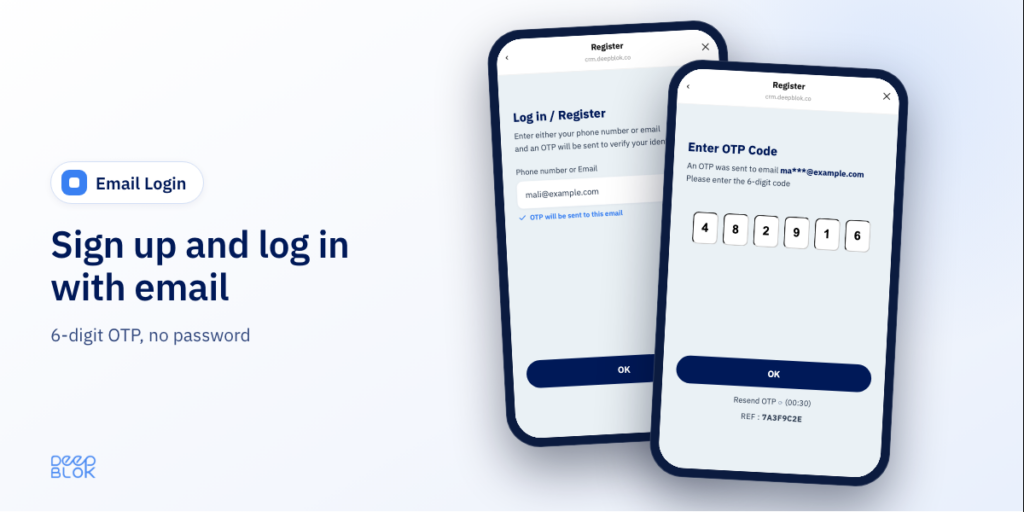
The customer types an email on the sign-up page. If your brand has both channels switched on, they see a single field and can type either a phone number or an email. The system works out which it is and confirms before they continue — for example, "OTP will be sent to this email" — so they know where the code is going before they tap.
Moment 2 — Enter the 6-digit OTP
The code is sent to that email. The screen shows the destination address partly masked for privacy, along with a reference code (REF) to match against the email they receive. The code is valid for 15 minutes and can be resent.
Moment 3 — Straight in, or on to the registration form
The system checks whether that email already has an account. If it does, the customer lands on the home page. If not, they go to the registration form. Nobody has to choose between "Sign up" and "Log in" — the step people most often get wrong in a typical loyalty program.
There is no password anywhere in the flow. Customers have nothing to set or remember, and your team has no forgotten-password requests to handle. The verified email is saved as the member's contact email automatically, so the form doesn't ask for it again. And if a customer changes email later, they can update it themselves from Settings on the member page, confirming with an OTP sent to the new address.
Web browser: one link and one QR code, wherever customers meet you
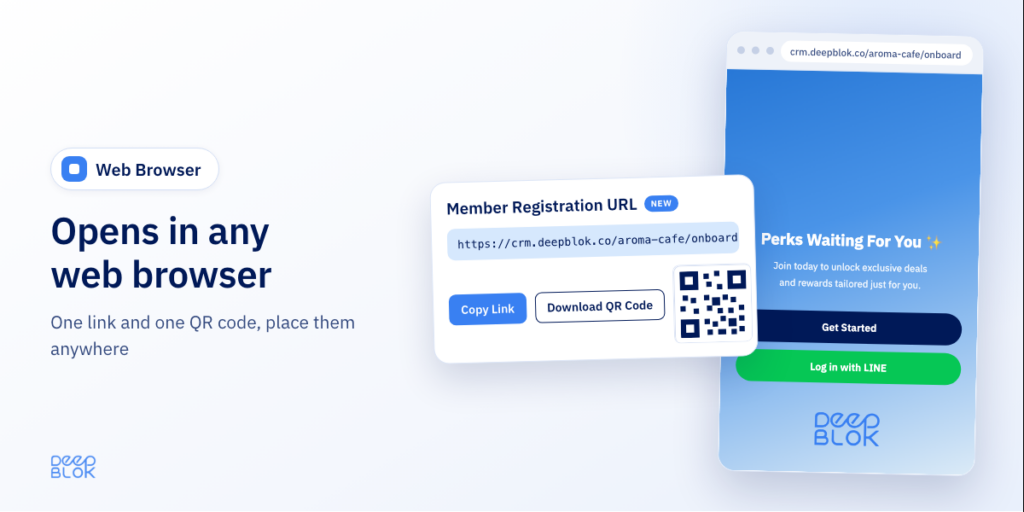
The member page opens in Chrome, Safari and Edge, in addition to LINE. The backoffice has a Member Registration URL card with your brand's own link, plus Copy Link and Download QR Code buttons.
| Where you place it | When the customer sees it |
|---|---|
| Your website | While browsing products or booking a service |
| Booking or order confirmation emails | Right after they've decided to buy — the moment they are most willing to join |
| Social media profiles | When they come to look you up |
| In-store signage, table tents, receipts | While they're with you — a phone camera scan is all it takes |
Nothing changes for customers who use LINE. Those who prefer it get a Log in with LINE button on the browser page to go back to the route they know. The button appears once your LINE Settings are configured. The member page supports Thai and English, and customers switch for themselves.
How do members without LINE earn points in store?
The same way as everyone else, and your staff have nothing new to learn. There are two ways.
- Scan the QR — the customer opens the member page in their browser and staff scan the QR code on screen.
- Look up by email — staff search for the member by email instead of phone number, for customers who signed up with email.
An international guest who joins while waiting in line earns points on their first bill, the same day.
You choose the channels: three options and when to use each
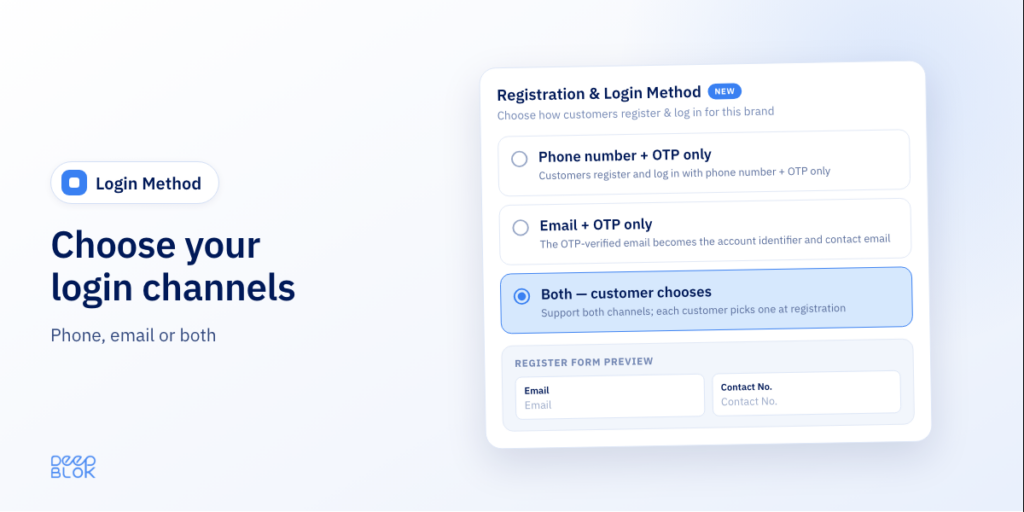
Set it at Settings › Register Form Management.
| Option | Best for |
|---|---|
| Phone number + OTP only | Brands whose customers are almost all in Thailand and on LINE — this is the default for every brand |
| Both — customer chooses | Brands with a mixed customer base: Thai and international, in-store and online |
| Email + OTP only | Brands launching a new program whose customers have used email from the start |
The registration form adjusts its fields to the channel. Phone sign-ups see a contact-email field, email sign-ups see a contact-number field, and each can be hidden, optional or required. A form preview in Thai and English updates as you configure it, before you save.
All of this is available to every brand at no extra cost.
Which businesses is this for?
Hotels, resorts and spas
International guests don't have a Thai number and many don't use LINE — but all of them have email, and most gave it to you when they booked. Put a QR code at the check-in counter or in the treatment room and let guests join with the same email they booked with. Points and privileges start from the first stay, not the second.
Shops and restaurants in tourist areas
Your queue has Thai customers and tourists side by side. Switch on both channels and use a single QR sign. Thai customers join with a phone number, tourists join with email, and staff don't have to explain two processes.
Brands that sell or take bookings on their own website
The customer is already in a browser. Sending them off to another app to become a member is where people drop out. Put the sign-up link on the page or in the order confirmation email and they can join without leaving the window.
Businesses with corporate customers
The contact on the customer's side usually works from a company email and would rather not use a personal number or personal LINE for work. Email fits the way they already operate.
A hypothetical example: a spa in a tourist town
This example is invented to illustrate how the feature is used. It is not a result from a real customer.
A spa has two groups of customers: locals who come regularly, and international tourists visiting for the first time. The first group are already members through LINE. For the second, staff used to write names and emails in a notebook.
The marketing team switches the setting to Both, downloads the QR code from the backoffice and prints it as a counter sign, and adds the same link to the booking confirmation email. Regulars keep logging in with their phone number on LINE as before. International guests scan the QR, enter an email, type the OTP and fill in a short form while they wait for their treatment room.
At the end of the month the team opens the member report and looks at the sign-up channel column. They can see how many new members came through LINE and how many through a web browser — a number that tells them whether the counter sign or the email link is doing the work.
Know which channel members came through, and keep reaching them
The Customer Registration and All Customer reports have a Channel column showing how each member signed up, with web-browser sign-ups listed separately. The reports also separate the Login Key — the value used to log in — from the contact email and phone, so your team knows which members log in with email and which with a phone number.
Members who join through a browser get the same privileges as any other member. You can send coupons or rewards to the group you choose through Targeted Campaign. The coupon goes into the member's account and they see it the next time they open the member page.
Put the member-page link where this group will come across it again — the next booking confirmation email, for example — so they can check what they've earned at any time.
What to know before you switch it on
- One account, one channel. A customer signs up with either a phone number or an email. Existing members with a phone-number account should keep logging in with it; signing up again with email creates a separate account.
- An email an existing member typed into the form earlier is a contact email. It can't be used to log in in place of their phone number.
- To add email, choose "Both". Switching to a single channel that differs from the current one means members who signed up through the old channel can no longer log in. The system warns you about this every time before you save.
- The Log in with LINE button on the browser page appears only for brands that have configured LINE Settings.
FAQ
Do customers need to set a password?
No. Both sign-up and login use a 6-digit OTP sent by email or SMS, depending on the channel the customer uses.
Can customers without LINE use it?
Yes. They open your brand's member-page link in a web browser and sign up with an email or phone number, whichever your brand has switched on.
Do existing members have to do anything once it's on?
No. Existing members keep logging in with their phone number on LINE exactly as before, as long as your brand keeps the phone channel on.
Is there an extra cost?
No. It's available to every brand, and you set it up yourself at Settings › Register Form Management.
