



 September 30, 2026
Engage every customer group with a spin-the-wheel game on LINE — set up separately for new members, regulars and the ones drifting away
Most loyalty programs give members exactly one thing to do: collect points and wait. While they wait there is nothing to do, no reason to open the member page, and no moment for the brand to talk to them.
The problem isn’t that customers don’t care about the brand. It’s that there is nothing for them to do except buy — even though the stretch between purchases is the longest part of the relationship, and the part where the brand is most absent from their lives.
Gamification fills that gap with a spin-the-wheel game members play from the member page on LINE, without waiting for their next purchase.
This article covers what members see, how to run a separate campaign for each customer group, how tightly you can control prize cost, and what it still can’t do.
The short version — what’s new
- A spin-the-wheel game that members open from a news post on the LINE member page — no extra app to download.
- Make spins free, or charge points per spin. If you charge, points are deducted automatically.
- Prizes land in the member’s My Coupons right away and work exactly like any other coupon.
- Run a separate campaign per customer group, and decide exactly how many big prizes are paid out per number of plays.
What members see on LINE
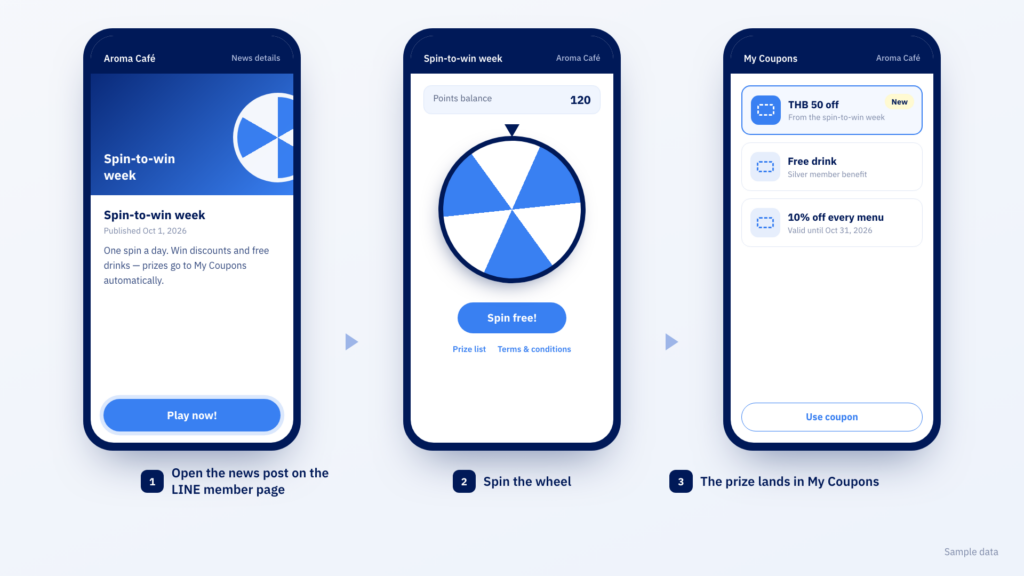
The wheel isn’t a separate app. Members see it as a news post on the LINE member page they already use. They open the post, tap Play now! and land on the wheel, which shows their points balance at the top along with the prize list and the campaign terms.
When they win, the prize lands in My Coupons automatically. There is no separate claim step, and no admin has to issue a code afterwards.
That is what keeps the wheel from being a detached toy. The loop closes back into the coupon system you already run — points turn into a spin, the spin turns into a coupon, and the coupon turns into a return visit.
Each customer group needs a different moment
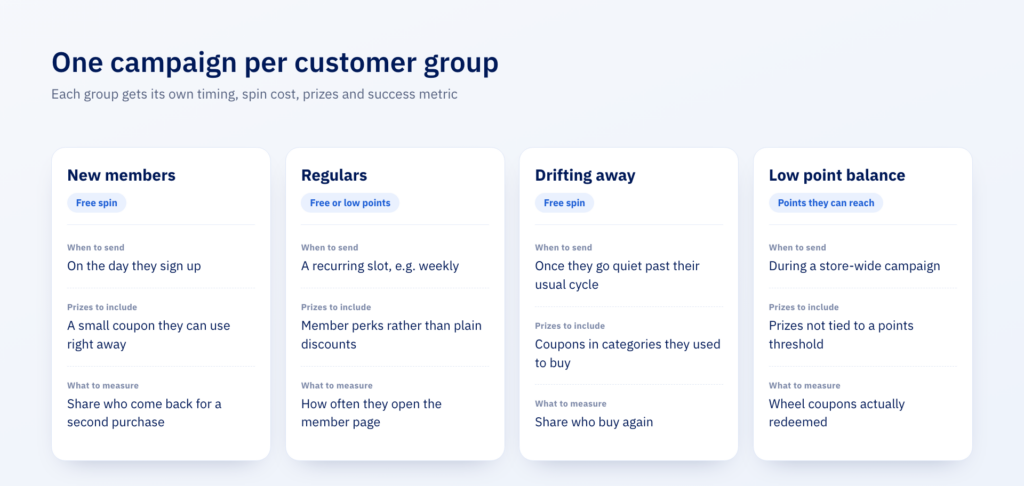
This is where the wheel differs from an ordinary promotion. A promotion goes to everyone in the same form, but the wheel can run as a separate campaign for each group — with its own prizes, timing, spin cost and success metric.
New members — give them something back on day one
The classic new-member problem is signing up and going quiet, because the points from a first purchase can’t buy anything yet. Make this campaign a free spin from the day they sign up, and they walk away with their first coupon without waiting to reach any threshold. The number to watch is the share of new members who come back for a second purchase — not how many people played.
Regulars — a reason to open the member page between purchases
This group doesn’t need a discount; they buy anyway. What they need is a reason to open the member page on days they aren’t buying. Run it as a recurring activity, such as a weekly slot, and fill it with member perks rather than plain discounts.
Members drifting away — win them back with an activity, not a price cut
Sending a straight discount works, but it erodes margin and teaches customers to wait for the next one. The wheel offers a different route: because each campaign takes its own prizes, you can pick what fits this group — if you know which category they used to buy most, put coupons for that category into this campaign specifically.
Worth knowing: the system doesn’t pick prizes for each individual automatically. You choose prizes that fit the group, then send that wheel to that group.
Members with low point balances — something to spend points on, without chasing a threshold
Your largest group often doesn’t have enough points for any catalogue reward. They open the redemption page, find nothing within reach, and stop opening it. Set a spin cost this group can actually reach, and points that were sitting idle finally have somewhere to go — deducted automatically, with nothing to reconcile.
How to give each group its own wheel
The mechanism is one campaign = one coupon bucket = one news post. The three are tied together as a set. If you want two groups to get different prizes, you build two sets side by side, each with its own prizes and its own news post sent to the group it’s meant for.
Each set takes three steps, in order, because every step uses something created in the one before.
Step 1 — Prepare a coupon bucket with codes
The coupon bucket is the pool of codes the game hands out when a member wins. When the bucket runs out, that prize runs out with it.
Step 2 — Create prizes in the Gamification group
Game prizes have to sit in the Gamification group and be published before you can attach them to a game.
Step 3 — Create the news post and the game
Create a news post in News & Activity, set it to open a game, then create the game campaign, attach the prizes and set the payout pattern. The end result is the Play now! button members see on LINE.
How tightly can you control prize cost?
The first thing marketing teams usually ask is whether they can set a win percentage. The answer: you can set the rate, but you set it by order, not by typing a percentage.
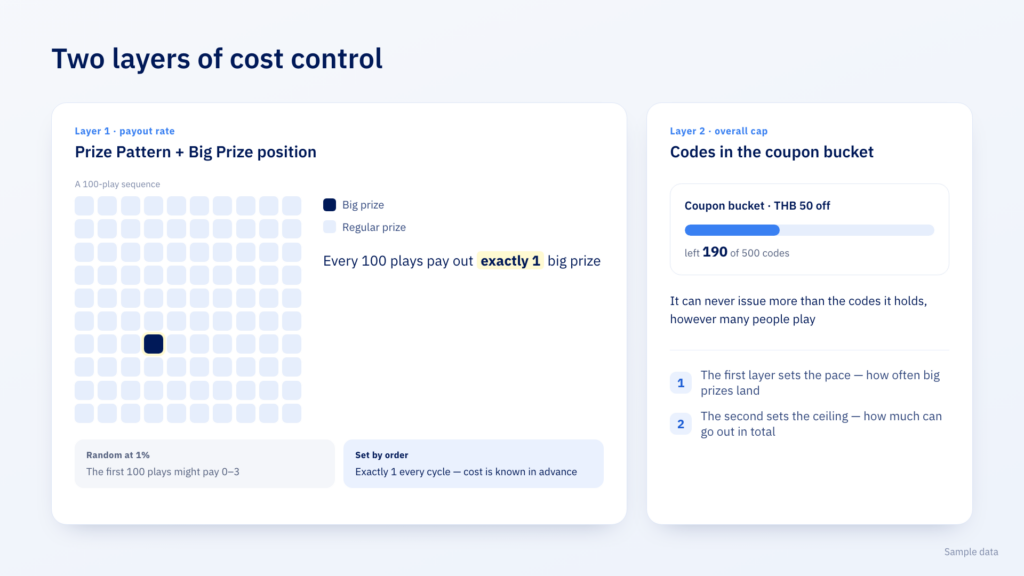
What you configure is the Prize Pattern, the order in which prizes are paid out, and the Big Prize position, which decides on which play the big prize lands. Lay out a 100-play pattern with one big-prize position, and that is a 1% rate.
This is more precise than a random percentage because it is fixed, not drawn. At a random 1%, the first 100 plays might pay out three big prizes or none. Setting it by order means you know from the start exactly how many big prizes go out per 100 plays — so campaign cost can be calculated in advance.
The second layer is the number of codes in the coupon bucket, which acts as an overall cap. However many people play, it can never issue more than the codes it holds. The first layer sets the pace; the second sets the ceiling.
Beyond those two layers, each campaign also lets you set:
- Prizes on the wheel — it always has 6 slots and takes 3 to 6 prizes, with any empty slots filled with a gift-box image
- Plays per person per day, which makes a genuine one-spin-a-day campaign possible
- An overall play quota for the campaign
- Start and end dates, plus a temporary pause for when something needs fixing
How much can you measure?
Every campaign has its own report: how many people played, how many logged in, how many prizes have gone out and how many are left, and when people played, shown as a timeline — with Export to Excel for further analysis.
The number that really matters isn’t just how many people played. It’s how many wheel coupons were actually redeemed, and whether the target group came back to buy — which you can follow up in the coupon reports you already have.
What it still can’t do
Stated plainly so you can plan around it.
- There is no percentage field. You control the rate through the Prize Pattern and Big Prize position — the same outcome, but you think in order rather than in probability.
- The system doesn’t pick prizes per individual. You choose prizes to fit a group, then send that wheel to that group.
- Separate groups mean separate campaigns. One campaign is tied to one coupon bucket and one news post.
- The game itself is configured in a separate system. You open it from a button in the back office, work on it in another tab, and need access to that system too.
- It’s an add-on service. Contact sales to enable it.
