



 September 23, 2026
Connect your official Lazada and Shopee stores to the loyalty program, so marketplace revenue turns into points on a real member profile
When a brand looks at how often a customer buys, the number on the screen is whatever came through the brand’s own channels — the store, the app, the website, the POS.
But the same customer may also be buying from you on Lazada or Shopee, and that revenue never travels back into the member base.
The consequence isn’t just a wrong figure. Everything built on that figure inherits the error — the tier they should have reached, the campaigns they should have received, and your read on what this customer is worth. All of it calculated from half the picture.
This article covers what v2.10.0 changes, what has to be set up on both the brand side and the customer side, when points actually arrive, and what still isn’t possible.
The short version — what’s new
- Official stores on Lazada and Shopee can now be connected to the loyalty program. Those orders land on the same member profile as an in-store purchase.
- It takes both halves — you connect the store, and the member links their own account from the member page on LINE. Miss either one and no points are awarded.
- Members link once, using one order number from an order that has already been delivered. Every later order then earns on its own.
- Points and coupons are awarded automatically within 1 day of successful delivery. Cancelled or returned orders are reversed automatically.
Why marketplace sales never reach your member base
The cause isn’t your loyalty program. It’s the platform.
When a customer checks out on Lazada or Shopee, the platform doesn’t tell the brand which member just placed that order. You see the order, the recipient name and the shipping address — but nothing that ties back to the member profile already sitting in your system.
Until now the workaround was importing a file, which means somebody has to match orders to members by hand every cycle. That works while order volume is small. Once marketplace revenue grows, it becomes a job nobody wants.
And the larger marketplace grows as a share of your revenue, the wider that gap gets.
v2.10.0 connects it — but it takes both halves
v2.10.0 connects your official stores on Lazada and Shopee to the loyalty program. The thing to get straight from the beginning is that earning from marketplace works in two halves, and you need both.
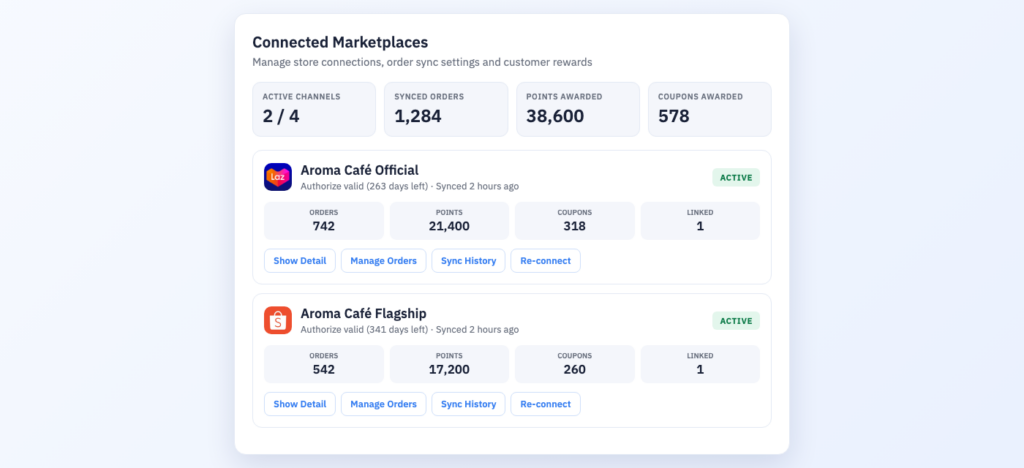
The first half is yours. Your team connects the official store on Lazada or Shopee to the loyalty program — once, at setup. From then on the Connected Marketplaces screen shows synced orders, points and coupons issued, broken out per store.
The second half is the customer’s. The member links their own marketplace account from the member page on LINE — once per person.
Miss either one and no points are awarded. Even with your store connected, a customer who never linked their account still earns nothing. Driving members to link is therefore a marketing job that has to be planned alongside switching the feature on — not something that finishes in the back office.
What the customer has to do
All of it happens on the LINE member page they already use. No extra app, and it’s once and done.
Step 1 — Open the “Other” tab on the member page
That tab holds a link your account card with a button for each channel your brand has switched on.
Step 2 — Tap the channel they want to link
If you run both, members see Lazada and Shopee and can link them separately.
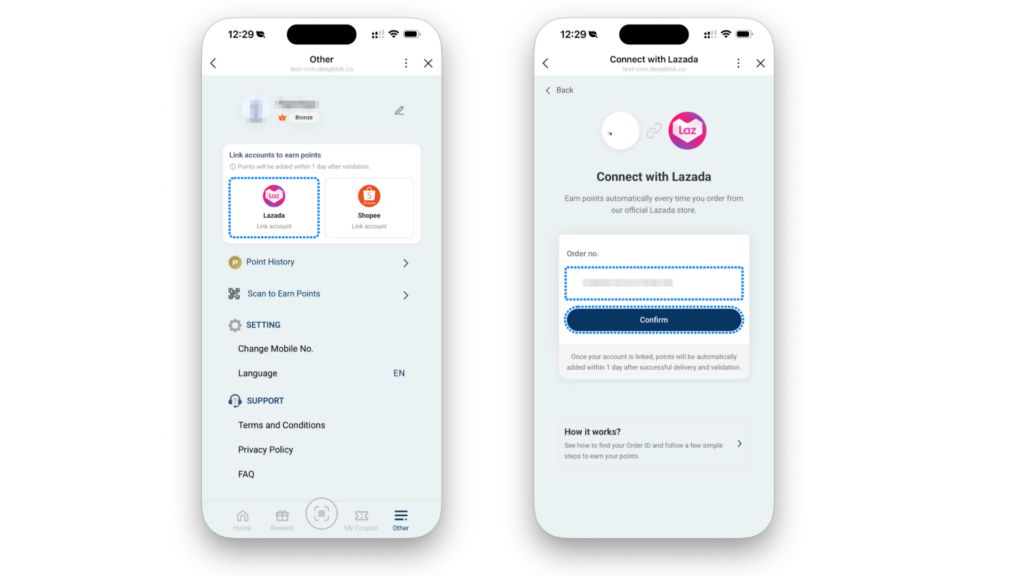
Step 3 — Enter an order number
The system uses one order number from an order that has already been delivered as proof that the marketplace account belongs to that member. There are two ways to find it — copy it from the order list inside the marketplace app, or read it off the shipping label on the box.
The common mistake: the number required is the order number, not the member ID and not the tracking number. Shipping labels also carry the courier’s own barcode, which is a different number entirely. Enter the wrong one and the system won’t confirm it.
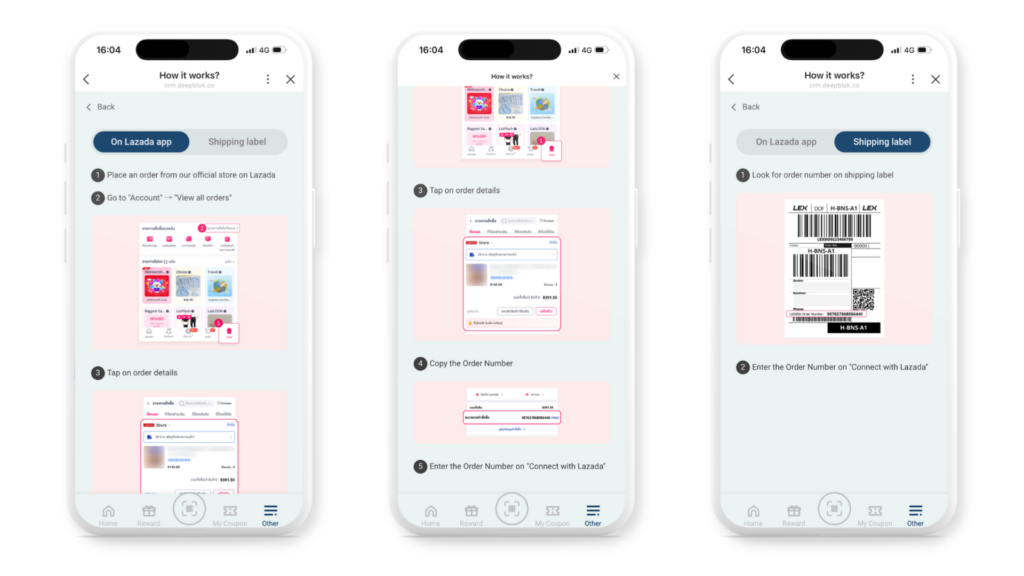
Step 4 — Confirm, and that’s it
Once confirmed, the link is permanent. Every later order from that account earns on its own. Members don’t have to tell you anything, and your team doesn’t import a file.
When points arrive, and how to check
The trigger is successful delivery, not checkout. Once an order is delivered and verified, points and coupons are awarded automatically within 1 day, following the promotion rules you already have.
So a customer who just ordered and can’t see points yet is behaving normally, not hitting a bug — and that’s a question your support team should have an answer ready for.
When somebody asks whether a particular order earned, there are three places to look. Member account → Account Info → E-COMMERCE LINKING answers whether that member has linked at all. Marketplace → Manage Orders shows whether an order was matched to a member and how many points it awarded. And Sync History shows whether the last sync run completed normally.
Cancelled and returned orders
Points and coupons are pulled back automatically. Your team never chases them down.
This matters more than it sounds. Without it a brand has two equally bad options — award immediately and risk paying out on revenue that didn’t hold, or withhold rewards until the return window closes, which makes the experience worse for the large majority who never return anything.
You can also pause rewards on any channel temporarily without disconnecting it. The connection, the settings and every linked member stay exactly as they were, and it picks up again the moment you switch it back on — useful when a promotion has to stop for a while but you don’t want to rebuild the setup.
What you can do once the revenue is in the base
Getting the revenue into your member base isn’t the finish line. It’s the point where it becomes useful.
Once marketplace orders are tied to a member profile, your team can build segments by purchase channel. Members who only ever buy on marketplace and have never been to a store become a group you can address — send them a coupon that only works in store, to pull them into a channel they’ve never tried. Members who buy on both are your highest-value customers and should get first access to anything special. And lapsed marketplace buyers are the target list for a win-back campaign.
Worth knowing: your team builds each segment from its own conditions. The system does not group customers automatically.
What it still can’t do
Stated plainly so you can plan around it.
- Your team can’t link on a customer’s behalf. There is no button for it — the back office is read-only on this.
- The feature has to be switched on for your brand first. If customers don’t see the linking card, it hasn’t been enabled yet — talk to your account team.
- Only your official store counts. Orders from other sellers on the platform don’t.
- Points aren’t instant. Within one day of successful delivery — so it doesn’t suit campaigns that have to reward on the spot.
- One member links one buyer account per platform. The same buyer account can’t sit under several members.
